Preloader
  • Follow Us On :
Request Demo Class Join Free Seminar
img
Course includes:
  • img Level Advanced
  • img Hours 48
  • img Total Class 24
  • img Certifications Yes
Share this course:

Cisco Certified Specialist Network Security VPN

  • 12 Jan 2026
  • ___ Students

COURSE OVERVIEW

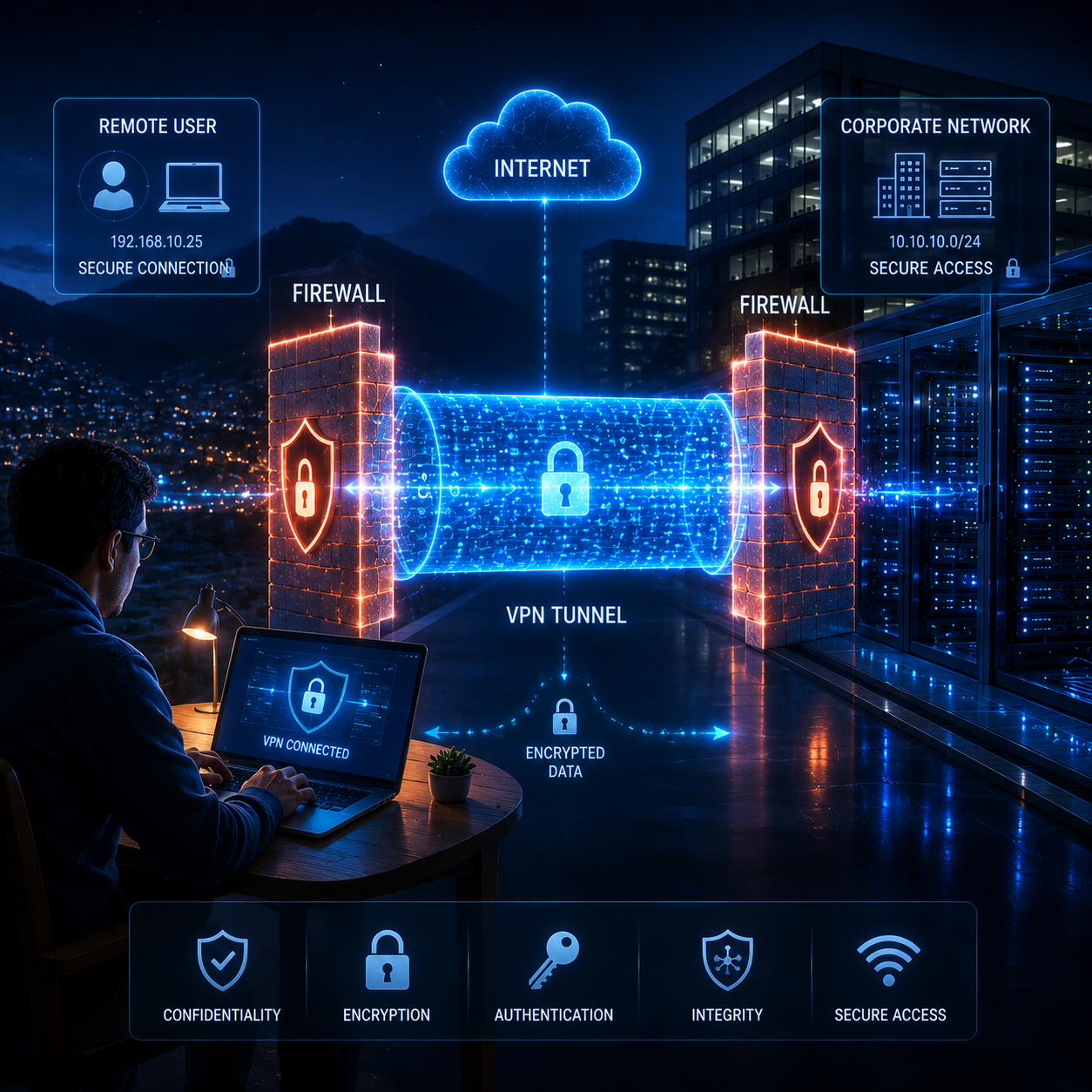
Step into the world of secure networking with our Cisco VPN Training Course your path to mastering enterprise level VPN solutions. Gain in-depth knowledge through Cisco's official curriculum, led by expert instructors. Enhance your learning with 24/7 hands-on lab access, real world scenarios, and personalized guidance. This comprehensive training empowers you to implement, configure, monitor, and support advanced VPN technologies. Unlock high paying career opportunities with our end to end placement support and elevate your future in network security.

Course Curriculum

This course is tailored for individuals aspiring to excel in the dynamic field of network security. Enroll if you are:

  • Gain comprehensive expertise in implementing, configuring, monitoring, and supporting enterprise Virtual Private Network (VPN) solutions.
  • Learn to deploy and troubleshoot various VPN technologies, including traditional IPsec, Dynamic Multipoint Virtual Private Network (DMVPN), FlexVPN, and remote access VPN
  • Acquire the skills to create secure, encrypted data transmissions that ensure confidentiality and integrity of sensitive information.
  • Understand how to establish VPN solutions that enable secure remote access, providing connectivity to users regardless of their location.
  • Master techniques to enhance privacy measures, ensuring a higher level of security for communication and data transfer.
  • Develop knowledge to improve internet privacy, speed, and overall performance.

Before taking this training, you should have the following knowledge and skills:

  • Basic Networking Knowledge: A solid grasp of fundamental networking concepts and protocols.
  • Familiarity with Cisco IOS Command-Line Interface (CLI): Basic experience using Cisco IOS CLI to effectively engage in hands-on activities.
  • Understanding of TCP/IP Protocols: Knowledge of TCP/IP protocols and how they operate.
  • General IT Security Awareness: Awareness of core IT security principles and best practices.
  • Cisco CCNA Certification or Equivalent Experience: While not required, holding a Cisco Certified Network Associate (CCNA) certification or similar experience is advantageous.

  • Security Operations Center (SOC) Analy
  • IT Manager (Security)
  • Senior Network Analyst
  • Systems Engineer (Security)
  • Cybersecurity Specialist
  • Network Administrator
  • IT Security Analyst
  • Security Consultant
  • VPN Administrator
  • Network Security Engineer

CISCO VPN COURSE OVERVIEW

  • Introduction: IPSec Terminology
  • Introduction: VPN
  • Introduction: What is IPSec VPN & Why?
  • Introduction: VPN Types
  • Introduction: Site-Site
  • Introduction: DMVPN
  • Introduction: GET VPN
  • Introduction: SSL VPN
  • Introduction: Flex VPN
  • Introduction: IPSec Features
  • Introduction: Confidentiality
  • Introduction: Integrity
  • Introduction: Data Origin Authentication
  • Introduction: Anti-Reply
  • Introduction: IPSec Protocols
  • Introduction: IKE
  • Introduction: ESP
  • Introduction: AH
  • Introduction: IKE Modes
  • Introduction: Main Mode
  • Introduction: Aggressive Mode
  • Introduction: Quick Mode
  • Introduction: IKE Phases
  • Introduction: Phase 1
  • Introduction: Phase 1.5
  • Introduction: Phase 2
  • Introduction: ISAKMP
  • Introduction: IPSec Mode
  • Introduction: Transport Mode & Header Structure
  • Introduction: Tunnel Mode & Header Structure
  • Introduction: NAT T
  • Introduction: Why NAT T
  • Introduction: NAT T Steps
  • Introduction: NAT T Support
  • Introduction: NAT T Detection
  • Introduction: NAT T Decision
  • Introduction: Security Association & Components
  • Introduction: SAD Security Association Database
  • Introduction: SPD Security Policy Database
  • Introduction: Detailed Explanation of AH
  • Introduction: Detailed Explanation of ESP
  • Introduction: Site-Site VPN
  • Introduction: SSL VPN
  • Introduction: SSL VPN Modes
  • Introduction: Clientless
  • Introduction: Thin Client
  • Introduction: Thick Client
  • Introduction: SSL VPN Requirements
  • Introduction: SSL VPN Working
  • Introduction: DMVPN
  • Introduction: DMVPN Terminologies
  • Introduction: NHRP
  • Introduction: MGRE
  • Introduction: DMVPN Working
  • Introduction: DMVPN Limitation
  • Introduction: DMVPN Advantages
  • Introduction: DMVPN Phases
  • Introduction: DMVPN Phase 1
  • Introduction: DMVPN Phase 2
  • Introduction: DMVPN Phase 3
  • Introduction: GET VPN
  • Introduction: GET VPN Terminologies
  • Introduction: GDOI
  • Introduction: Key Server (KS)
  • Introduction: Key Encryption Key (KEK)
  • Introduction: Traffic Encryption Key (TEK)
  • Introduction: Rekey Process
  • Introduction: Unicast Rekey Process
  • Introduction: Multicast Rekey Process
  • Introduction: Group Member (GM)
  • Introduction: Tunnel Header Preservation
  • Introduction: TBAR
  • Introduction: COOPs
  • Introduction: GET VPN Working
  • Introduction: Flex VPN
  • Introduction: IOS Flex VPN
  • Introduction: IKEv2 Introduction

After completing Cisco VPN training, learners can pursue the following job roles:

  • IT Manager (Security)
  • Cybersecurity Specialist
  • Technical Support Engineer (Network Security)
  • Systems Engineer (Security)
  • Security Operations Center (SOC) Analyst
  • IT Security Specialist
  • Network Administrator
  • Security Analyst
  • VPN Administrator
  • Network Security Engineer

  • Labs: Configure Cisco IOS as CA
  • Labs: IOS Site to Site with Pre-Shared
  • Labs: IOS Site to Site with GRE over IPSec
  • Labs: IOS Site to Site with Self-Signature (optional)
  • Labs: IOS Site to Site with RSA Signature IOS CA
  • Labs: IOS Site to Site with Static VTI with Wildcard Key
  • Labs: IOS Site to Site with Aggressive Mode
  • Labs: IOS Site to Site with Overlapping Subnet First Method
  • Labs: IOS Site to Site with Overlapping Subnet Second Method (optional)
  • Labs: IOS Site to Site with Keyring (optional)
  • Labs: IOS Site to Site with Keyring & Self-Signature (optional)
  • Labs: IOS Site to Site with Hostname Authentication (optional)
  • Labs: IOS Site to Site with Pre-Shared using IPv6
  • Labs: IOS Site to Site with RSA Signature IPv6 IOS CA
  • Labs: IOS Site to Site with Stateless Failover
  • Labs: IOS Site to Site with Stateful Failover (optional)
  • Labs: IOS Site to Site with NAT-T
  • Labs: IOS Site to Site between IOS & ASA using IKEv1 Pre-Shared
  • Labs: IOS Site to Site between IOS & ASA using IKEv2 Pre-Shared
  • Labs: IOS Site to Site Troubleshoot Ticket 1
  • Labs: IOS Site to Site Troubleshoot Ticket 2
  • Labs: IOS Site to Site Troubleshoot Ticket 3
  • Labs: IOS Site to Site Troubleshoot Ticket 4
  • Labs: IOS Site to Site Troubleshoot Ticket 5
  • Labs: IOS Site to Site Troubleshoot Ticket 6
  • Labs: IOS Site to Site Troubleshoot Ticket 7
  • Labs: IOS Site to Site Troubleshoot Ticket 8
  • Labs: IOS Site to Site Troubleshoot Ticket 9
  • Labs: IOS SSL Clientless
  • Labs: IOS SSL Thin Client
  • Labs: IOS SSL Thick Client
  • Labs: IOS SSL with High Availability & NAT
  • Labs: IOS SSL Single Gateway Multiple Context
  • Labs: IOS SSL Multiple Gateway Multiple Context
  • Labs: IOS SSL Advanced (Split Tunnel, Banner, URL Filtering, Group Lock, Time Range)
  • Labs: IOS SSL Troubleshoot
  • Labs: IOS DMVPN Single Hub with EIGRP
  • Labs: IOS DMVPN Dual Hub with EIGRP
  • Labs: IOS DMVPN Single Hub with OSPF
  • Labs: IOS DMVPN Dual Hub with OSPF
  • Labs: IOS DMVPN Phase 1 Deployment
  • Labs: IOS DMVPN Phase 2 Deployment
  • Labs: IOS DMVPN Phase 3 Deployment
  • Labs: IOS DMVPN with IOS CA
  • Labs: IOS DMVPN with IKEv2
  • Labs: IOS DMVPN with NAT T
  • Labs: IOS DMVPN with Dynamic IP Addressing
  • Labs: IOS DMVPN for IPv6
  • Labs: IOS DMVPN Troubleshoot
  • Labs: IOS GET VPN Unicast Pre Shared
  • Labs: IOS GET VPN Unicast with RSA IOS CA
  • Labs: IOS GET VPN Multicast Pre-Shared Dense Mode
  • Labs: IOS GET VPN Multicast Pre Shared Sparse Mode (optional)
  • Labs: IOS GET VPN Multicast Pre Shared Sparse Dense Mode (optional)
  • Labs: IOS GET with COOPs & GM Authorization
  • Labs: IOS GET VPN Troubleshoot
  • Labs: IOS Flex IPv4 Site to Site with Classic Method
  • Labs: IOS Flex IPv4 Site to Site with SVTI
  • Labs: IOS Flex IPv4 Site to Site with Minimum Command
  • Labs: IOS Flex IPv4 Site to Site with RSA IOS CA
  • Labs: IOS Flex IPv4 Remote Access with PreShared
  • Labs: IOS Flex IPv4 Remote Access with RSA IOS CA
  • Labs: IOS Flex IPv6 Site-to-Site with Pre Shared
  • Labs: IOS Flex IPv6 Remote Access with Pre Shared

Cisco Certified Specialist: Network Security VPN (300-730 SVPN)

  • Exam Name: Implementing Secure Solutions with Virtual Private Networks (SVPN)
  • Exam Code: 300-730 SVPN
  • Exam Duration: 90 minutes
  • Languages Available: English, Japanese
  • Exam Cost: USD $300 (plus local taxes, fees may vary)
  • Exam Format: Multiple-choice and simulation-based questions
  • Delivery Method: Online proctored exam or at Pearson VUE testing centers
  • Prerequisite Recommendation:
  • Certification Validity: 3 years
  • Strong networking and security fundamentals
  • Cisco CCNP Security Core Exam (350-701 SCOR)
img

Mark Jukarberg

UX Design Lead

(4.8 Ratings)

Dorem ipsum dolor sit amet, consectetur adipiscing elit, sed do eiusmod tempor incididunt ut labore et dolore magna aliqua Quis ipsum suspendisse ultrices gravida. Risus commodo viverra maecenas accumsan.

Reviews

4.8
12 Ratings
5
2
4
1
3
0
2
0
1
0
img
Jura Hujaor 2 Days ago

The best LMS Design System

Maximus ligula eleifend id nisl quis interdum. Sed malesuada tortor non turpis semper bibendum nisi porta, malesuada risus nonerviverra dolor. Vestibulum ante ipsum primis in faucibus.