Preloader
  • Follow Us On :
Request Demo Class Join Free Seminar
img
Course includes:
  • img Level Advanced
  • img Hours 208
  • img Total Class 104
  • img Certifications Yes
Share this course:

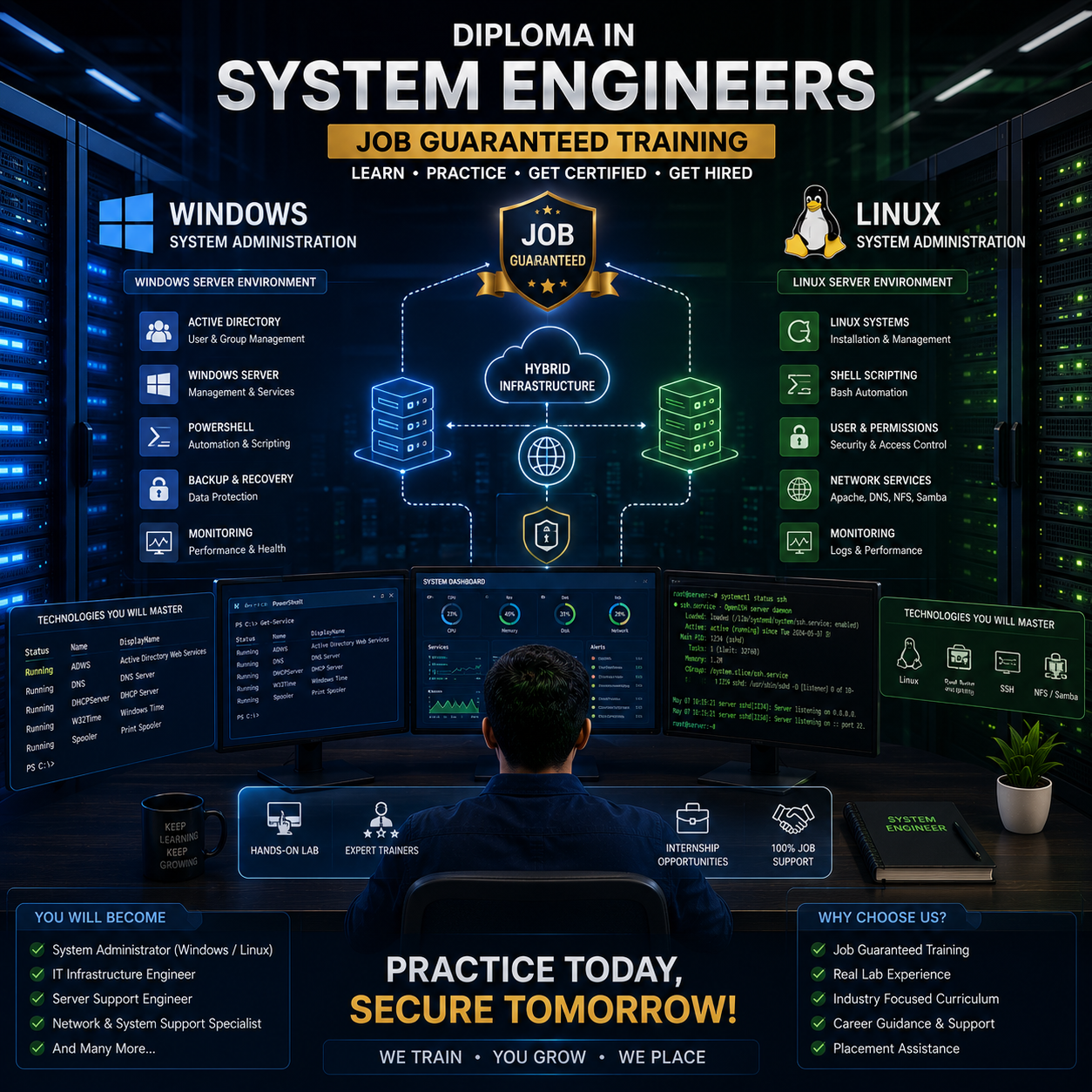
Diploma in System Engineers Job Guaranteed Training

  • 12 Jan 2026
  • ___ Students

COURSE OVERVIEW

Embark on a comprehensive journey with our 1-Year System Engineering Diploma and gain hands-on expertise in managing enterprise IT infrastructure. This program combines theory and practical labs across CCNA, Windows Server administration, PowerShell, Red Hat Enterprise Linux (RHCSA & RHCE), ISP system administration, and interview preparation, equipping you to configure, manage, and secure modern enterprise and ISP systems. 
 

Course Curriculum

  • Aspiring System Engineers 
  • IT Professionals & System Administrators 
  • Recent Graduates & Career Switchers 
  • Networking and Cybersecurity Enthusiasts 
  • IT Support and NOC Professionals

  • Basic computer literacy 
  • Fundamental networking knowledge (TCP/IP, subnets, routing) 
  • Familiarity with Windows and Linux operating systems 
  • Motivation to learn enterprise IT and server administration 
  • Basic understanding of server roles, permissions, and protocols

  • System Engineer
  • Windows Server Administrator
  • Linux Administrator 
  • IT Infrastructure Specialist 
  • NOC Technician 
  • Systems Support Engineer 
  • Network & Server Operations Engineer 
  • SOC Analyst (Windows/Linux focused)

Modules Covered In This Diploma Course

  • MODULE 1 : CCNA 200-301 
  • MODULE 2 : Administering Windows Server 
  • MODULE 3 : Administering Windows PowerShell 
  • MODULE 4 : Administering Windows System (Special Module) 
  • MODULE 5 : Red Hat Enterprise Linux (RHCSA) 
  • MODULE 6 : Red Hat Enterprise Linux (RHCE) 
  • MODULE 7 : Red Hat Enterprise Linux Administration for ISP (Special Module) 
  • MODULE 8 : Interview Preparation & Grooming 
  • MODULE 9 : ISP Internship Program (3 Months, 8 Hours/Day)


Details Of Every Course

MODULE 1 : CCNA 200-301

  • Get Started with Cisco Command-Line Interface (CLI)
  • Observe How a Switch Operates
  • Perform Basic Switch Configuration
  • Implement the Initial Switch Configuration
  • Inspect TCP/IP Applications
  • Configure an Interface on a Cisco Router
  • Configure and Verify Layer 2 Discovery Protocols
  • Implement an Initial Router Configuration
  • Configure Default Gateway
  • Explore Packet Forwarding
  • Troubleshoot Switch Media and Port Issues
  • Troubleshoot Port Duplex Issues
  • Configure Basic IPv6 Connectivity
  • Configure and Verify IPv4 Static Routes
  • Configure IPv6 Static Routes
  • Implement IPv4 Static Routing
  • Implement IPv6 Static Routing
  • Configure VLAN and Trunk
  • Troubleshoot VLANs and Trunk
  • Configure a Router on a Stick
  • Implement Multiple VLANs and Basic Routing Between the VLANs
  • Configure and Verify Single-Area OSPF
  • Configure and Verify EtherChannel
  • Improve Redundant Switched Topologies with EtherChannel
  • Configure and Verify IPv4 ACLs
  • Implement Numbered and Named IPv4 ACLs
  • Configure a Provider-Assigned IPv4 Address
  • Configure Static NAT
  • Configure Dynamic NAT and Port Address Translation (PAT)
  • Implement PAT
  • Log into the WLC
  • Monitor the WLC
  • Configure a Dynamic (VLAN) Interface
  • Configure a DHCP Scope
  • Configure a WLAN
  • Define a Remote Access Dial-In User Service (RADIUS) Server
  • Explore Management Options
  • Explore the Cisco DNA Center
  • Configure and Verify NTP
  • Configure System Message Logging
  • Create the Cisco IOS Image Backup
  • Upgrade Cisco IOS Image
  • Configure WLAN Using Wi-Fi Protected Access 2 (WPA2) Pre-Shared Key (PSK) Using the GUI
  • Secure Console and Remote Access
  • Enable and Limit Remote Access Connectivity
  • Secure Device Administrative Access
  • Configure and Verify Port Security
  • Implement Device Hardening

MODULE 2 : Administering Windows Server 

  • Introduction to Windows Server
  • Installation & Configuration
  • Active Directory Domain Services (ADDS)
  • DHCP & DNS Server Setup
  • File Server & Sharing, NTFS & Share Permissions
  • Group Policy Management (GPO)
  • User & Computer Management
  • Remote Desktop Services
  • Server Backup, Restore, & Security
  • Hyper-V & Virtualization
  • Server Monitoring & Troubleshooting

MODULE 3 : Administering Windows PowerShell 

  • PowerShell Overview & Syntax
  • Cmdlets, Variables, Operators
  • Conditional Statements & Loops
  • Functions & Script Files
  • Working with Files, Folders & Registry
  • WMI, CIM, System Process & Service Management
  • Remote Management (PS Remoting)
  • Active Directory Automation
  • Task Scheduler Integration
  • Create Custom Scripts for Real Scenarios

MODULE 4 : Administering Windows System (Special Module)

  • Task Manager & Resource Monitoring
  • Services Console (services.msc) Management
  • Windows Event Viewer & Log Analysis
  • System Configuration (msconfig)
  • Device Manager & Driver Handling
  • Windows Registry Basics and Editing (regedit)
  • Local Users and Groups (lusrmgr.msc)
  • Managing Scheduled Tasks
  • Windows Firewall & Advanced Security
  • System Updates and Patch Management (WSUS Optional)
  • ADDS Server Backup and Restore
  • Group Policy Edit
  • Storage Pool, Troubleshooting, NIC Team, DNS Log

MODULE 5 : Red Hat Enterprise Linux (RHCSA)

  • Accessing System & Obtaining Support
  • Navigating File Systems
  • Managing Local Users and Groups
  • Controlling Access to Files
  • Managing SELinux Security
  • Tuning System Performance
  • Installing and Updating Software Packages
  • Managing Basic Storage
  • Controlling Services and the Boot Process
  • Managing Networking
  • Analyzing and Storing Logs
  • Implementing Advanced Storage Features
  • Scheduling Future Tasks
  • Accessing Network-Attached Storage
  • Managing Network Security
  • Running Containers

MODULE 6 : Red Hat Enterprise Linux (RHCE)

  • Controlling Services and Daemons
  • Managing IPv6 Networking
  • Configuring Link Aggregation and Bridging
  • Network Port Security
  • Managing DNS for Servers
  • Configuring Email Transmission
  • Providing Remote Block Storage
  • Providing File-based Storage
  • Configuring MariaDB Databases
  • Providing Apache HTTPD Web Service
  • Writing Bash Scripts
  • Bash Conditionals and Control Structures

MODULE 7 : Red Hat Enterprise Linux Administration for ISP (Special Module)

  • ISP-level Linux Server Deployment and FTTH System Administration
  • Monitoring ISP Networks and Managing Multiple Servers
  • Implementing Security and Firewall Policies for ISP Infrastructure
  • Hands-On Labs: Deploy Live ISP Linux Servers and Services
  • Configure FTTH Network Servers and Routing
  • Monitor Server Performance and Network Connectivity
  • Apply Firewall and Security Policies for ISP Operations

MODULE 8 : Interview Preparation and Grooming Sessions

  • Create Professional Resumes and Optimize LinkedIn Profiles
  • Overview of Windows Administration Roles and Responsibilities
  • Common Windows Interview Question Types
  • Core Windows OS Concepts Review (Installation, Configuration, Updates)
  • Active Directory, DNS, DHCP, and Group Policy Essentials
  • Troubleshooting Windows Issues (Boot, Performance, Services)
  • Windows Server Features and Roles Discussion
  • PowerShell Basics and Administrative Tasks
  • Resume Building for Windows Administrator Roles
  • Professional Etiquette and Communication Skills
  • Mock Interviews and Feedback

MODULE 9 : ISP Internship Program (3 Months)

  • Apply Skills in a Live ISP Environment
  • Configure Windows/Linux Servers and Manage ISP Systems
  • Monitor, Troubleshoot, and Optimize ISP Infrastructure
  • Document Configurations, Changes, and Incident Reports

  • System Engineer 
  • Windows Server Administrator 
  • Linux System Administrator 
  • Network Administrator 
  • Network Engineer 
  • IT Infrastructure Specialist 
  • NOC Technician 
  • ISP System Administrator 
  • ISP NOC Engineer 
  • FTTH Network Administrator 
  • IT Support Engineer 
  • Microsoft Systems Engineer 
  • Active Directory Administrator 
  • PowerShell Automation Engineer 
  • Desktop/Endpoint Administrator 
  • Red Hat Systems Engineer 
  • Cloud/Linux Support Engineer 
  • DevOps/Linux Specialist (entry-level) 
  • Application Support Engineer 
  • Data Center Technician 
  • SOC Analyst (Tier 1 / Tier 2) 
  • Cybersecurity Support Engineer 
  • Firewall Administrator (Fortinet / Cisco ASA / Checkpoint) 
  • IT Security Analyst 
  • Junior Penetration Tester

MODULE 1 : CCNA 200-301 Labs 

  • Get Started with Cisco CLI 
  • Perform Basic Switch Configuration 
  • Implement Initial Switch Configuration 
  • Configure Interface on Cisco Router 
  • Configure and Verify Layer 2 Discovery Protocols 
  • Implement Initial Router Configuration 
  • Configure Default Gateway 
  • Troubleshoot Switch Media and Port Issues 
  • Troubleshoot Port Duplex Issues 
  • Configure Basic IPv6 Connectivity 
  • Configure and Verify IPv4 Static Routes 
  • Configure IPv6 Static Routes 
  • Implement IPv4/IPv6 Static Routing 
  • Configure VLAN and Trunk 
  • Troubleshoot VLANs and Trunk 
  • Configure Router on a Stick 
  • Implement Multiple VLANs and Routing Between VLANs 
  • Configure and Verify Single-Area OSPF 
  • Configure and Verify EtherChannel 
  • Configure and Verify IPv4 ACLs 
  • Implement Numbered and Named IPv4 ACLs 
  • Configure Provider-Assigned IPv4 Address 
  • Configure Static NAT 
  • Configure Dynamic NAT and PAT 
  • Implement PAT 
  • Log into the WLC 
  • Monitor the WLC 
  • Configure VLAN Interface 
  • Configure DHCP Scope 
  • Configure WLAN 
  • Define RADIUS Server 
  • Configure and Verify NTP 
  • Configure System Message Logging 
  • Create Cisco IOS Image Backup 
  • Upgrade Cisco IOS Image 
  • Configure WLAN with WPA2 PSK (GUI) 
  • Secure Console and Remote Access 
  • Enable & Limit Remote Access Connectivity 
  • Secure Device Administrative Access 
  • Configure & Verify Port Security

MODULE 2 : Administering Windows Server Labs 

  • Install and Configure Windows Server 
  • Configure and Test ADDS 
  • Configure DHCP & DNS Server 
  • Implement NTFS & Share Permissions 
  • Apply Group Policy Objects (GPO) 
  • Configure and Test Remote Desktop Services 
  • Perform Server Backup and Restore 
  • Deploy Hyper-V Virtual Machines 
  • Monitor and Troubleshoot Server Performance

MODULE 3 : Administering Windows PowerShell Labs 

  • Write and Run Basic PowerShell Scripts 
  • Create Variables, Operators, and Loops 
  • Build and Test Custom Functions & Script Files 
  • Automate File, Folder, and Registry Tasks 
  • Manage Processes and Services via PowerShell 
  • Perform Remote Management with PS Remoting 
  • Automate Active Directory with Scripts 
  • Integrate Task Scheduler with PowerShell 
  • Build Real-World Automation Scripts

MODULE 4 : Administering Windows System Labs 

  • Monitor Processes with Task Manager & Resource Monitor 
  • Manage Services via Services.msc 
  • Analyze Logs with Event Viewer 
  • Configure Startup Services with msconfig 
  • Manage Drivers via Device Manager 
  • Manage Users & Groups with lusrmgr.msc 
  • Create & Monitor Scheduled Tasks 
  • Configure and Test Windows Firewall Rules 
  • Apply Updates via WSUS 
  • Perform ADDS Backup & Restore 
  • Edit Group Policy Objects 
  • Configure Storage Pools, Troubleshoot, NIC Teaming, DNS Log

MODULE 5 : Red Hat Enterprise Linux (RHCSA) Labs 

  • Access & Navigate Linux File Systems 
  • Create and Manage Users/Groups 
  • Configure and Test SELinux Policies 
  • Install and Update Packages 
  • Manage Storage and Mount Points 
  • Control Services and Boot Targets 
  • Configure Networking (IPv4/IPv6) 
  • Analyze Logs and Schedule Cron Jobs 
  • Configure NFS and SMB (NAS) 
  • Secure Server with Firewall Rules 
  • Run Containers and Test Deployments

MODULE 6 : Red Hat Enterprise Linux (RHCE) Labs 

  • Configure IPv6 Networking 
  • Implement Link Aggregation & Bridging 
  • Deploy DNS Server and Test Queries 
  • Configure Postfix for Email Transmission 
  • Configure iSCSI & NFS Storage 
  • Deploy and Secure MariaDB Database 
  • Configure Apache HTTPD Web Service 
  • Write and Execute Advanced Bash Scripts 
  • Automate Service Management with Scripts

MODULE 7 : Red Hat Linux for ISP Labs 

  • Deploy ISP-Level Linux Servers (DHCP, DNS, FTP) 
  • Configure FTTH Network Servers & Routing 
  • Monitor Multiple Servers & Analyze Logs 
  • Implement & Enforce Firewall Policies 
  • Test Failover and Redundancy 
  • Secure Customer Data Services on ISP Backbone

MODULE 8 : Interview Prep Labs 

  • Build Resume and LinkedIn Profile 
  • Practice AD, DNS, DHCP & GPO Setup 
  • Troubleshoot Windows Issues (Boot, Network, Performance) 
  • Write & Test PowerShell Scripts 
  • Participate in Mock Interviews (Troubleshooting Scenarios) 
  • Simulate Windows Server Admin Tasks 
  • Receive Feedback & Improve Performance

MODULE 9 : ISP Internship Labs 

  • Live ISP Device Configuration 
  • Troubleshoot Server, Routing, Connectivity Issues 
  • Implement Firewall and Security Policies 
  • Analyze Network Traffic and Document Results

Upon completion, students are prepared for vendor and professional certifications: 

  • Cisco Certified Network Associate (CCNA)-200-301
  • MikroTik Certified Network Associate (MTCNA)
  • Exam AZ-800: Administering Windows Server Hybrid Core Infrastructure
  • Exam AZ-801: Configuring Windows Server Hybrid Advanced Services
  • EX200-Red Hat Certified System Administrator (RHCSA)
  • EX294-Red Hat Certified Engineer (RHCE)
img

Mark Jukarberg

UX Design Lead

(4.8 Ratings)

Dorem ipsum dolor sit amet, consectetur adipiscing elit, sed do eiusmod tempor incididunt ut labore et dolore magna aliqua Quis ipsum suspendisse ultrices gravida. Risus commodo viverra maecenas accumsan.

Reviews

4.8
12 Ratings
5
2
4
1
3
0
2
0
1
0
img
Jura Hujaor 2 Days ago

The best LMS Design System

Maximus ligula eleifend id nisl quis interdum. Sed malesuada tortor non turpis semper bibendum nisi porta, malesuada risus nonerviverra dolor. Vestibulum ante ipsum primis in faucibus.